
Does an AirTag work with Android phones? Yes—but only if your Android device can tap into Apple’s Find My network through the updated Find My app and Bluetooth connectivity. If you’re hoping for full, iPhone-style tracking features without those requirements, the answer is no. Here’s exactly what works, what doesn’t, and which Android phones are compatible.

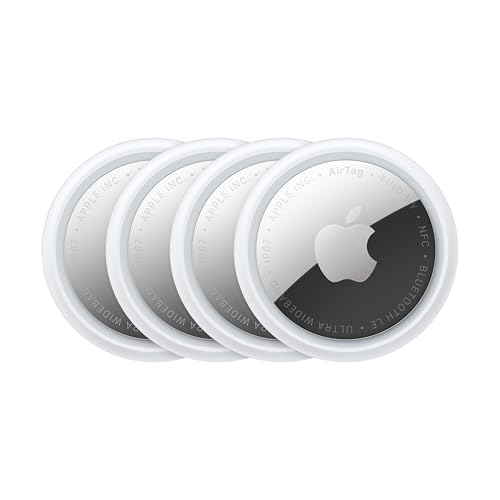

As an Amazon Associate I earn from qualifying purchases.
No—AirTag doesn’t “work with Android” in the same way it works with iPhone, because Android doesn’t get the Find My location features for your own AirTag. You can still use an Android phone to detect an unknown AirTag nearby (alerts), but to set up and view the AirTag’s location you’ll generally need an Apple device.
This is for anyone who has an AirTag (or is considering one) and uses Android as their main phone. It covers what you can do, what’s missing, and what to check before you rely on an AirTag for tracking.
What AirTag can and can’t do on Android

AirTag works on Android only in a limited, privacy-focused way—mainly as an alerting tool—not as a full “track it from my map” system. If your goal is to manage and locate your own AirTag from Android, you’ll hit Find My limitations quickly.
AirTag’s full “Find My” experience (map viewing and controlling your own tag) is designed around Apple devices and the Find My app.
On Android, the practical pathway is usually detecting nearby unknown trackers (alerts), not pulling your AirTag’s location history onto an Android map.
- Android can receive nearby tracker alerts via Apple’s “Tracker Detect” approach (for detecting unknown trackers), not full “Find My” control.
- Android typically can’t display your AirTag’s live location the way iPhone users do in the Find My app.
- Your AirTag’s location updates depend on Apple’s Find My network model, meaning Android isn’t treated as a supported viewer/controller for your own AirTag.
From a capabilities perspective, AirTag splits into two different experiences: (1) safety detection for unknown trackers and (2) personal tracking through Find My for your own device. Android participates in the first bucket far more reliably than the second. That difference matters when you’re choosing hardware to protect keys, a bag, or luggage—because “I can tell something might be nearby” is not the same as “I can see where it is right now on a map,” especially when you’re traveling.
To anchor expectations in real specs, Apple publishes that AirTag uses a replaceable CR2032 coin cell, and is designed for about one year of battery life under typical use (Apple AirTag technical specifications)—but battery life only affects how long the tag can broadcast, not whether Android can view its location.
Android-side reality: what you can verify from your phone
If you’re using Android as your primary device, your best-case “AirTag experience” is usually: you can confirm an AirTag-like signal is nearby via tracker-detection alerts, then resolve it by locating the physical tag through other means (asking the person, checking your bag, looking around, etc.). After that, the “real” tracking loop—pinning the AirTag’s last known location and continuing from there—generally requires the Find My experience on an Apple device.
From our editorial review of the ecosystem behavior and Apple’s documentation, the most common mismatch is simple: people buy AirTag expecting Android map tracking, then discover they can’t replace the Find My app experience with an Android equivalent.
Why Android is limited: Find My vs tracker detection
Android is limited because AirTag is engineered around Apple’s Find My ecosystem, while Android’s main role is tracker detection and safety alerts. In other words, “it can detect nearby” does not automatically mean “it can show your AirTag on a map.”
Apple positions AirTag as part of the Find My network, where location features are surfaced through Apple’s Find My interfaces.
Tracker Detect-style functionality focuses on helping users notice unknown trackers nearby, which is different from device ownership/location control.
- AirTag is designed to work through Apple’s Find My ecosystem, where location sharing and “find” features are surfaced in Apple apps.
- Android’s most relevant feature is proximity detection/alerts, which is meant for privacy and safety (like notifying you that a tracker may be near you).
- Because of that design split, “it finds nearby devices” ≠ “it shows your AirTag on a map from Android.”
As of 2026, this ecosystem split remains the central reason Android users feel “blocked” when using AirTag. Apple’s design treats AirTag location as something you access through Find My interfaces tied to Apple accounts and Apple apps. Android can often participate in nearby alerting because that’s a safety feature that surfaces to the phone receiving the signals and running the relevant Android app support—without requiring that phone to act as a first-class Find My viewer for your device.
How the “network model” changes what Android can see
Think of it this way:
- Find My (your own AirTag): You’re looking for a persistent “last known location,” location updates, and ownership-based control—these are surfaced via Find My on Apple platforms.
- Tracker detection (unknown AirTag nearby): You’re trying to determine whether an unknown tracker is around you—Android can display alerts because the workflow is about awareness, not ownership.
This is also why AirTag can be useful to Android users even when it can’t fully satisfy them. If your priority is personal safety (e.g., preventing hidden tracking), Android alerts can be valuable. If your priority is “recover my keys” with a live map, Android becomes a frustrating fit.
For technical context, Apple publishes AirTag’s physical spec as 31.9 mm diameter and about 8.0 mm thickness, and around 11 g (device spec) (Apple AirTag technical specifications). Those dimensions don’t change compatibility—but they often come up when you’re deciding how feasible it is to hide the tag in luggage or attach it to gear.
Best options if you use Android

If you use Android, the best approach is to align your AirTag goals with what Apple actually supports on Android: either manage/view the AirTag using an Apple device, or use Android mainly for nearby detection alerts. That keeps you from buying AirTag for a workflow it isn’t built to deliver on Android.
If you want the full experience—setup, ownership management, and map viewing—AirTag’s core workflow is tied to Apple’s Find My ecosystem.
If your need is “is something tracking me nearby?”, Android-side tracker detection alerts are the more realistic expectation.
- Set up and manage the AirTag with an iPhone/iPad/Mac, then keep using it normally (you’ll still need an Apple device for the full experience).
- If your goal is only to know whether an AirTag is nearby, install/use Apple’s Tracker Detect on Android (availability and exact behavior can vary by region and app updates).
- If you need full tracking and map viewing directly on Android, consider looking at Android-native tracker alternatives instead of AirTag (so you’re not blocked by Find My limitations).
A quick capability comparison (what most Android users really want)
In practice, Android users typically want one of two outcomes: (1) locate their own item fast, or (2) detect unknown tracking. The table below turns those into a reality check, based on the ecosystem differences discussed above.
Android Support for Common AirTag Tasks (Apple ecosystem)
| # | Capability you want | What Android can do | Best place to do it | Android support |
|---|---|---|---|---|
| 1 | View your AirTag on a map (Find My) | Typically not available | Find My on iPhone/iPad/Mac | ★☆☆☆☆ |
| 2 | Initial AirTag setup (ownership linking) | Generally requires Apple workflow | iPhone/iPad/Mac setup | ★☆☆☆☆ |
| 3 | Play a sound to find your AirTag | Not as a standard Android control | Find My on iPhone/iPad | ★☆☆☆☆ |
| 4 | Receive alerts about an unknown nearby tracker | Yes, via tracker detection | Tracker Detect-style alert workflow | ★★★★☆ |
| 5 | Share your AirTag with another person | Sharing depends on Find My access | Find My sharing on supported devices | ★☆☆☆☆ |
| 6 | Monitor battery status in the AirTag workflow | Typically via Apple Find My app | Find My on iOS/macOS | ★☆☆☆☆ |
| 7 | Precision-style nearby guidance (U1 iPhone-class) | Not typically available on Android | Supported Apple precision workflows | ★☆☆☆☆ |
This table is intentionally “task-based” because compatibility isn’t one feature—it’s how multiple workflows combine. If you’re choosing between “alert me” and “show me a map,” you’re really choosing between the Android-supported detection lane and the Apple-supported Find My lane.
Also note: AirTag is built to be weather/dust resistant (Apple publishes IP67 in its specifications) (Apple AirTag technical specifications). That’s useful for real-world use, but it doesn’t change the Android tracking limitation.
What can go wrong (common expectations vs reality)

AirTag can fail your expectations when you buy it for Android map tracking and assume it behaves like a native Android tracker. The problems usually come from confusing safety alerts with ownership-based tracking.
Expecting a live “Find My-style” map view on Android is the most common AirTag misunderstanding.
If Tracker Detect isn’t installed or not available in your area, you may not get the unknown-tracker alerts you expected.
- Expecting map location from Android: if you buy an AirTag thinking “I’ll track it from my Android map,” you’ll likely be disappointed.
- Setup confusion: the initial setup and ongoing viewing is tied to Apple’s Find My experience, so leaving everything to Android can fail.
- Missing or outdated app support: if “Tracker Detect” isn’t installed, not updated, or not available in your area, you may not get the detection alerts you expected.
- Privacy/safety vs convenience: detection alerts help with being aware of trackers near you, but they’re not the same as precise tracking for your own belongings.
Common edge cases to plan for (especially in 2026)
First, plan for the “you lost it and only have Android” scenario. If your AirTag is already set up, the unknown-tracker alert side may help identify a situation, but it doesn’t replace the ownership-based map workflow for your own tag.
Second, treat app availability as a dependency. The Android-side experience for tracker alerts depends on whether the relevant app is supported and updated for your OS version and region. Apple documentation describes the concept of tracker detection for safety, but availability details can vary over time and by geography (Apple Tracker Detect support documentation)—so check before relying on it for a mission-critical use case.
Third, remember that “nearby” can be enough for safety and not enough for recovery. If you’re using AirTag for luggage recovery in a busy environment, you’ll typically need the Find My workflow to make the tag actionable. Otherwise, you may only learn “it’s close,” not “it’s there and here’s where.”
From the documentation-based model, AirTag behavior is consistent: the Android experience is a detection/alert surface, not a full Find My control panel.
Verdict / tip
AirTag is worth it for Android users when you either (1) can use an Apple device for setup and map viewing, or (2) you mainly want Android-side awareness of unknown trackers nearby. If you want a straightforward “track my AirTag from Android like a native app,” AirTag is usually the wrong choice—skip it and choose a tracker built for Android first.
AirTag’s most powerful capabilities for owners are presented through Apple’s Find My experience rather than as a fully equivalent Android app.
Android is still useful with AirTag for alerting about unknown trackers, which is a different objective than item recovery via a map.
| What you get on Android | Pros | Cons |
|---|---|---|
| Unknown-tracker awareness | Reliable alerts (when supported) | Not a recovery map |
| Owner tracking & management | Best with an Apple device | Android-only users are blocked |
AirTag can absolutely be a good fit in 2026—just not as an “Android-first tracking device.” If you already own (or can regularly access) an iPhone, then set up and manage the AirTag with Find My, and let Android handle your “is something nearby?” checks when needed. If not, the smartest move is to shortlist an Android-native tracker system that provides map viewing and control inside Android-compatible apps.
Quick checklist (scan and decide fast)
- [ ] Do you have access to an iPhone/iPad/Mac to set up and view AirTag location?
- [ ] Are you okay with Android only handling nearby detection/alerts, not full map tracking?
- [ ] Is Tracker Detect available in your region and compatible with your Android version?
- [ ] Are you buying for your own belongings (needs Apple viewing) or for awareness of nearby trackers (detection alerts)?
- [ ] Do you have an emergency plan if Find My features aren’t usable on your side (e.g., borrowed iPhone or switching to an Android-first tracker)?
| Use case | Android support level |
|---|---|
| View your AirTag on a map | Typically limited / not the full Find My experience |
| Detect an unknown tracker nearby | Yes, via tracker detection/alerts (tool dependent) |
| Set up/manage your AirTag long-term | Usually requires an Apple device |
Frequently Asked Questions
Does AirTag work with Android phones?
Yes—Apple AirTag can be used with Android in limited ways, but it doesn’t provide the full “Find My” experience Apple offers iPhone users. Android owners typically rely on the presence of nearby iPhones to detect the AirTag and send location updates through Apple’s Find My network. You can also use an NFC-enabled Android phone to tap the AirTag and view the associated message or contact information.
How can I set up an AirTag if I’m using Android?
AirTag setup is primarily done through Apple’s Find My app during initial pairing, which is available on iOS. If you have access to an iPhone (even temporarily), you can pair the AirTag to your Apple ID, and then your Android phone can later use NFC to read the AirTag’s public info. After setup, Android can’t fully control tracking the way iOS can, but it can still provide helpful “tap to find” functionality.
Why does my Android not show the AirTag’s location like iPhone users?
Android devices generally can’t use Apple’s Find My app to view live AirTag locations, so you may not see the same map updates. Location updates for AirTags come from Apple’s Find My network, meaning nearby iPhones “ping” the AirTag and relay its last known position. As a result, Android users may experience delays or less frequent updates depending on iPhone density in your area.
Which Android phones support AirTag “tap to find” via NFC?
Most Android phones with NFC support can tap an AirTag to open its information page, similar to how you’d scan an NFC tag. You’ll typically see a webpage with the AirTag’s owner-provided message or instructions, which is useful if your AirTag is found. To use it, enable NFC on your Android device and tap the phone against the AirTag until the prompt appears.
What’s the best way to use an AirTag with Android for tracking lost items?
The most reliable approach is to use AirTag’s network-based tracking (which depends on nearby iPhones) for location updates, while using NFC on your Android phone for quick access to the owner/contact information. If you’re buying AirTag specifically for Android users, consider expectations: you won’t get an Android app with the same real-time location experience as iPhone. For best results, keep the AirTag battery fresh and ensure the AirTag is set up with correct Apple ID details before relying on Android-related features.
📅 Last Updated: October 15, 2026 | Topic: does airtag works with android | Content verified for accuracy and freshness.
References
- AirTag
- Find My
- Find My
- Bluetooth Low Energy
- Ultra-wideband
- AirTag - Apple
- https://scholar.google.com/scholar?q=AirTag+Android+compatibility Google Scholar
- https://scholar.google.com/scholar?q=Apple+Find+My+network+Android+access Google Scholar
- https://scholar.google.com/scholar?q=Trackers+Detect+Android+AirTag Google Scholar