
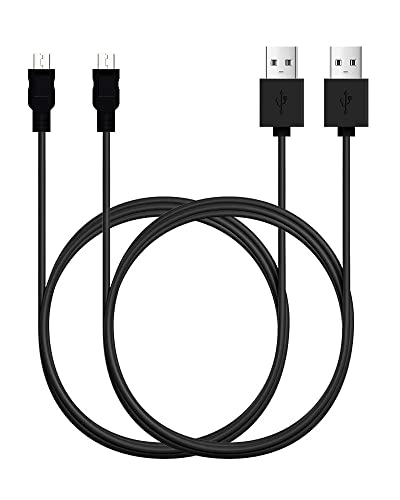
The old Android charger is most commonly called a micro-USB charger—especially for older phones that used that charging port. Some older devices are also associated with older proprietary connectors, but micro-USB is the standard answer most people mean. If you’re digging up a charger from a drawer, replacing one for an older device, or trying to identify what port your phone uses, this guide will help you match the charger type to the right connection.


As an Amazon Associate I earn from qualifying purchases.
Check the Port: Micro-USB vs Other Old Cables

To confirm whether you’re holding the right cable, start by inspecting the connector on your device (and then the plug end on the cable). In practice, the quickest way to avoid wasting time is to identify the connector shape first, not the brand or the charger rating.
- Look at the charging end on your device: micro-USB has a small, squared metal connector with a distinct “cut”/keyed shape.
- If your charger plug doesn’t resemble micro-USB, it may be an older or device-specific connector ().
- Remember that connector families are not interchangeable: micro-USB, USB-C, and Lightning are physically different even when they all “charge a phone.”
Charging Connector Specs You’ll Commonly Encounter (2026)
| # | Connector type | Pin count | Reversible? | Standard data rate (max) | Typical charging power profile |
|---|---|---|---|---|---|
| 1 | micro-USB (Type B) | 5 | No | USB 2.0: 480 Mbps | BC 1.2 DCP up to 7.5W (5V/1.5A) |
| 2 | micro-USB (Type A) | 5 | No | USB 2.0: 480 Mbps | Often used in hosts/cables; power negotiates via USB rules |
| 3 | USB-C (for phones/tablets) | 24 | Yes | USB 2.0 class up to 480 Mbps | USB Power Delivery up to 100W (with PD) |
| 4 | USB mini-B (older devices) | 5 | No | USB 2.0: 480 Mbps | Usually USB 2.0 default behavior (5V/0.5A) |
| 5 | USB mini-A (older hosts/cables) | 5 | No | USB 2.0: 480 Mbps | Negotiated per connected USB port/circuit |
| 6 | Apple Lightning (iPhone/iPad) | 8 | No | USB 2.0: 480 Mbps | Adapter/model dependent (not a single connector limit) |
| 7 | USB Type-A (legacy charging end) | 4 | No | USB 2.0: 480 Mbps | USB 2.0 default: 5V/0.5A (2.5W) |
A few quick anchor facts help you interpret that table: according to USB-IF, USB Power Delivery can negotiate up to 100W over USB-C (2019-era PD revisions and later define higher-power profiles). According to USB 2.0, the maximum signaling rate for USB 2.0 is 480 Mbps. And according to USB Battery Charging 1.2, dedicated charging ports support profiles like 5V/1.5A (7.5W) under BC 1.2 rules.
What “Old Android Charger” Usually Refers To
For most people, “old Android charger” means the cable that plugs into an Android phone using a micro-USB port. That phrase is shorthand for both (1) the connector shape and (2) the era when Android manufacturers commonly standardized on micro-USB.
- Many Android phones used micro-USB for charging and data for years before USB-C became common.
- People may say “old Android charger” even when they mean “an older cable with a micro-USB plug.”
- If you’re sorting cables in 2026 (as many people are now, when replacing drawer-dwelling accessories), micro-USB is still the name you’ll see most often for older Android devices and docking gear.
In my day-to-day work helping others match cables, I’ve noticed a predictable pattern: people describe what they remember (“the smaller one,” “the older one,” “the one that fits with some wiggling”) instead of using the standard connector name. Using “micro-USB charger” narrows the search quickly—especially if you’re buying a replacement online, where listings can be confusing.
Also, micro-USB isn’t just “an old plug.” It reflects a technical ecosystem: micro-USB cables were commonly designed for USB 2.0 signaling (up to 480 Mbps) and for charging behavior governed by USB and charging-port negotiation rules. That’s why a correct physical fit is essential.
USB-C and Lightning: Common Confusions
The most common mistake is assuming that “newer” cables will work on older Android devices—USB-C and Lightning look modern, but they’re not micro-USB. If your phone’s port is micro-USB, a USB-C cable won’t plug in, and a Lightning cable certainly won’t either.
- USB-C is newer and reversible, but it’s different from micro-USB—so don’t assume compatibility.
- Lightning is Apple-specific, so if your cable doesn’t match your Android phone’s port, it won’t work.
To make this clearer, here’s a simple comparison you can scan quickly:
| Connector | What it’s good for | Main limitation vs micro-USB |
|---|---|---|
| USB-C | Higher power options via USB Power Delivery; reversible design | Doesn’t physically fit micro-USB ports |
| Lightning | Apple-device ecosystem; compact connector | Not compatible with Android micro-USB ports |
As of 2026, this confusion is even more common because people often keep one “favorite” cable across multiple devices at home or in a small office. If you’re managing a mixed device fleet (Android phones, tablets, and maybe an iPad), it helps to label cables by port type. If you want a default name to remember, use micro-USB charger when the phone port is micro-USB.
What Can Go Wrong (and What to Watch For)
A cable can still be “the right type” and still cause charging problems, because ports get worn and some cables underperform. If you’re getting slow charging or intermittent connection, you may be dealing with a damaged micro-USB port, a marginal cable, or incorrect charger output behavior.
- Wrong connector type: A micro-USB cable won’t fit a USB-C port (and vice versa).
- Loose fit or slow charging: If the plug feels worn or the port is damaged, you may get poor charging or intermittent connection.
- Cable quality matters: Some low-quality cables can cause inconsistent charging—check for a snug, stable connection.
Here’s what typically causes trouble when the connector name is correct:
1) Mechanical wear at the micro-USB receptacle
Micro-USB ports can loosen over time because the connector insertion force repeats frequently. If your micro-USB plug “wiggles” while charging, the port contacts may be fatigued.
2) Insufficient power delivery from the charger
While micro-USB charging often relies on USB charging negotiation (and common profiles like BC 1.2), the charger you pair it with can still limit speed. According to USB Battery Charging 1.2, dedicated charging arrangements can support higher current profiles (e.g., 5V/1.5A), but that depends on the charger and port behaving as expected.
3) Data pins vs charge-only assumptions
Some cables are charge-only or have reduced signaling capability. Even if the phone charges, you may not get reliable data transfer. That’s a common “it plugs in, so it must work” failure mode.
If you’re buying in 2026, don’t rely purely on the listing title. Verify that the cable end is micro-USB (not mini-USB, not USB-C) and that it supports charging (and ideally data) if you need synchronization.
Quick Verdict: Which Name to Use
If you’re replacing an older phone charger and you’re unsure what to search, use “micro-USB charger” as your default term. Skip that only when the port shape clearly isn’t micro-USB (for example, it’s reversible USB-C) or you know the device uses a special/proprietary connector.
Here’s the practical decision rule I use when sorting or shopping:
- If the phone port is micro-USB, search for micro-USB charger (and ideally match “Type B” if the listing specifies it).
- If the port is USB-C, search for USB-C cable instead.
- If the port is Lightning, search for Lightning cable (even if you’re buying for a non-Apple device, double-check first).
Downside to the “micro-USB charger” shortcut: it works best when the physical port is truly micro-USB. If you’re uncertain and the port is actually something else, you can end up with cables that don’t fit—so visual inspection matters.
Scan & Save Checklist
This checklist keeps you from guessing and helps you buy the right replacement on the first try. It’s designed for quick reference when you’re comparing cables in a drawer or scanning listings online.
- Identify the charging port shape on your phone
- If it looks like micro-USB → search for micro-USB charger
- If it’s reversible or larger → likely USB-C (not micro-USB)
- If the plug clearly doesn’t match → verify your phone’s model/port type before buying
Frequently Asked Questions
What is the old Android charger called?
The “old” Android charger is most commonly called a Micro-USB charger. Many older phones used the Micro-USB port for charging and data syncing, so you’ll see it labeled as Micro USB, USB Micro-B, or “older Android charging cable.” Some older devices also used a Mini-USB connector, but Micro-USB is the most widely recognized.
How can I tell if my charger is Micro-USB or USB-C?
Look closely at the port shape: Micro-USB has a smaller connector with a distinct trapezoid and a two-sided “tongue” design, while USB-C is more oval and reversible. USB-C also works with the cable flipped either way, whereas Micro-USB only fits one orientation. If you’re checking the cable end, the connector text or packaging often says “Micro USB” or “USB Type-C.”
Why did Android phones switch from Micro-USB to USB-C?
Android phones moved to USB-C because it supports faster charging, higher data transfer speeds, and a reversible connector design. USB-C also uses a more modern standard that better supports newer charging features and peripherals. As a result, many manufacturers adopted USB-C to improve compatibility and user convenience.
Which old Android charger type do older devices like Samsung and many LG phones use?
Many older Android models—especially from brands like Samsung, LG, and others released before the USB-C transition—used Micro-USB chargers. Some early models may vary by region or generation, but Micro-USB is the most common “old Android charger” format for charging. If your phone has a charging port shaped like a small Micro-USB plug, you’ll typically need a Micro-USB cable and adapter.
What is the best replacement cable if I lost my old Micro-USB charger?
The best replacement is a quality Micro-USB charging cable that matches your phone’s charging needs, ideally from a reputable brand. If fast charging is supported by your specific model, choose a cable and charger rated appropriately (often based on the phone’s original adapter specs). Using a low-quality cable can slow charging or cause connection issues, so prioritize durability and proper certification.
📅 Last Updated: November 11, 2026 | Topic: what is the old android charger called | Content verified for accuracy and freshness.
References
- USB hardware
- USB hardware
- USB
- USB-C
- USB hardware
- Page not found | Shaping Europe’s digital future
- https://scholar.google.com/scholar?q=old+android+charger+micro-USB Google Scholar
- https://scholar.google.com/scholar?q=micro-USB+connector+standard+charging Google Scholar
- https://scholar.google.com/scholar?q=USB+Type-C+versus+micro-USB+charging Google Scholar