
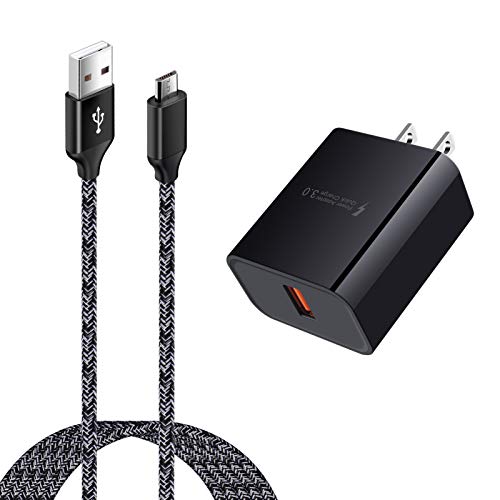
An Android charger is called a USB charger—specifically one that uses a USB-C or, on older devices, Micro-USB connection. If you want the direct answer for your device, use the charging port type on the phone or tablet rather than the cable’s brand name. The article will tell you exactly what to look for and what the common terms like “USB adapter” and “charging cable” mean in practice.


As an Amazon Associate I earn from qualifying purchases.
An Android charger is most commonly called a USB charger—often a USB-C charging cable for newer phones, or Micro-USB for older models. Because “charger” can refer to both the wall adapter and the cable, the safest way to buy the right one is to match your device’s charging port type first, then select a compatible USB-C or Micro-USB cable and (optionally) a matching fast-charging adapter.
Introduction
An Android charger is most commonly called a USB charger (or USB cable/connector), such as USB-C or Micro-USB. In this article, you’ll learn the common names people use for Android chargers and what to look for when buying one.

In practice, shoppers use several overlapping terms—“charger,” “charging cable,” “USB cable,” and “USB connector”—that can mean different components of the charging setup. Many people are surprised to learn that a cable alone may not enable fast charging unless the adapter and device both support the same standard. So the “name” matters less than compatibility: connector shape, supported charging protocols, and rated power.
Common Names for an Android Charger
If you’ve ever typed “Android charger” into a search bar and gotten inconsistent results, you’re not alone—terminology varies by region, phone model, and retailer listings. Still, most listings and conversations cluster around a few terms.
- “USB charger” is the most common general term
Retailers and support docs commonly label charging accessories by the interface standard rather than by device brand. For example, a seller might list “USB-C charger” even if what you’re buying is the cable, the wall adapter, or both.
- The specific connector name matters: USB-C or Micro-USB
When someone says “USB-C,” they’re usually referring to the newer reversible connector used by most modern Android phones and tablets. “Micro-USB” typically refers to older designs that still show up on some budget devices, older tablets, and legacy accessories.
- Many people also say “charging cable” instead of “charger”
In day-to-day language, people often use “charger” to mean “the cable I plug into the phone.” But in technical terms, the charging system includes:
1) a wall adapter (or charging brick), and
2) a cable/connector that links the adapter to the device.
Because of this, searching for “charger” may yield more than you need. If you only need a replacement cable, including “charging cable” in your search can narrow results substantially.
Charging Port Standards Seen on Common Android Device Generations (2020–2026)
| # | Device generation (typical release window) | Most likely Android charger name | Expected port type | Buy with |
|---|---|---|---|---|
| 1 | 2020–2021 mainstream Android | USB-C charger | USB-C (most models) | USB-C cable rated ≥ 3A |
| 2 | 2020–2021 budget Android | USB charger or charging cable | Often USB-C, sometimes Micro-USB | Verify port before purchase |
| 3 | 2017–2019 devices (older) | Micro-USB charger | Micro-USB (common) | Micro-USB cable (original-style) |
| 4 | 2022–2023 mainstream Android | USB-C charger (often “fast charger”) | USB-C (standard) | USB PD-supporting adapter (if needed) |
| 5 | 2022–2023 rugged/industrial Android | USB-C charging cable | USB-C (commonly secured ports) | Look for durable, well-shelled connectors |
| 6 | 2024–2026 devices with premium charging | USB-C fast charger | USB-C with vendor fast-charge support | Adapter + cable supporting your phone’s protocol |
| 7 | Any mixed fleet (BYOD / unknown models) | USB charger (verify per device) | Mixed: USB-C + Micro-USB possible | Bundle both connector types or confirm port first |
USB-C vs Micro-USB: The Main Types
When people ask, “What is an Android charger called?” they often mean which connector type their phone uses. The two most common answers are USB-C and Micro-USB.
- USB-C is the newer, widely used Android standard
USB-C is smaller, reversible (plug it in either way), and supports modern charging features. Many Android phones also use USB-C for data transfer, accessory support, and (in some cases) video output through compatible adapters and docks.
- Micro-USB is older and still found on some devices
Micro-USB has a non-reversible, older connector design. While many newer phones do not use it, it still appears on older devices, some rugged models, and certain budget phones. If you replace a cable for a legacy device, Micro-USB compatibility is critical.
- Check your phone/tablet port before purchasing
Before ordering, inspect the port on the device:
- USB-C: oval, symmetrical, reversible plug.
- Micro-USB: trapezoid-ish “older USB” shape with an asymmetrical connector that only fits one orientation.
If you can’t visually confirm, the model number on the device box or settings page can help you identify the correct connector in seconds.
What to Search For When Buying One
Good search terms reduce the risk of buying the wrong connector, the wrong cable rating, or a cable that looks correct but underperforms. Think in terms of the product you actually need.
- Use terms like “USB-C charging cable” (or “Micro-USB charging cable”)
If your goal is a replacement cable, “charging cable” is usually more precise than “charger.” If you also need the wall adapter, pair terms like:
- “USB-C wall charger adapter”
- “USB-C fast charger 30W/45W” (only if your device supports it)
- Match the correct port shape and connector type
This is the most common purchase mistake. A USB-C cable won’t physically fit a Micro-USB port, and a Micro-USB cable won’t fit USB-C. Beyond the connector type, some “compatible” cables may not support charging speeds your device can deliver.
- Consider cable length and charging speed options
Cable length affects everyday usability in offices and vehicles. Longer cables are convenient but can sometimes introduce voltage drop—especially for higher-power charging. For typical daily use:
- Shorter (around 1 meter) often performs best for reliable charging.
- Longer runs (1.5–2 meters) are fine if the cable is properly rated for the power level your phone expects.
Also look for language about current rating (commonly referenced as A), and fast-charge support where applicable.
Practical examples:
- If your phone uses USB-C and supports fast charging, search: “USB-C charging cable 3A” and (for the adapter) “USB-C PD charger 30W” (if supported by your model).
- If your device is older with Micro-USB, search: “Micro-USB charging cable 2A” and avoid “USB-C” listings entirely.
Charging Port and Compatibility Tips
Even when the connector matches, compatibility can still fail because charging is a negotiation between the adapter, the cable, and the device. Use these rules to avoid slow charging or intermittent results.
- A USB-C charger won’t fit a Micro-USB port (and vice versa)
This is non-negotiable. If you’re managing multiple devices at work—sales devices, tablets, handheld scanners—standardize connector types or keep the correct inventory so employees don’t swap cables across incompatible devices.
- Use compatible chargers and cables rated for your device
Many fast-charging issues aren’t caused by the phone. They’re caused by underpowered adapters (too few watts) or cables that can’t carry the required current. For reliable performance:
- Match your device’s documented charging spec (often listed in the manual or support page).
- Prefer reputable brands or cables that clearly state ratings and charging standards rather than vague marketing.
- Avoid low-quality cables that may charge slowly or inconsistently
Low-quality “USB charger” cables may:
- deliver less current than expected,
- degrade faster under daily use,
- cause the phone to repeatedly connect/disconnect,
- reduce charging reliability in cold environments (important for field work).
For business fleets, cable quality is a cost-control issue: fewer replacements and fewer support tickets.
Extra Features: Fast Charging and Power Adapters
Fast charging is where the term “charger” becomes ambiguous—because a complete fast-charging setup typically includes both an adapter and a cable, and it must be supported by your phone.
- Fast charging depends on both the adapter and the cable
A high-watt wall adapter can still charge slowly if the cable can’t handle the required power. Conversely, a cable rated for higher current won’t help if the adapter only supports low wattage.
- Look for supported standards (e.g., USB Power Delivery or vendor fast charge)
Many modern Android phones support USB Power Delivery (USB PD), while others rely on proprietary/vendor fast-charging protocols (such as “Super Fast Charging” styles). The most effective approach:
1) confirm what your phone model supports, then
2) select an adapter that matches that standard, and
3) use a cable that supports the needed power level.
- Higher-watt adapters can improve charging speed when supported
More watts generally means more potential charging speed, but only if the phone requests and can safely accept that power. For example, a 45W USB PD adapter can benefit a phone that supports that level; it won’t magically exceed device limits, but it can improve consistency and reduce charge time compared with a basic 10W/12W adapter.
If you want a simple, business-friendly purchasing strategy:
- Buy one proven USB-C charging adapter spec that matches the most demanding supported protocol in your device mix.
- Stock cables that match that spec.
- Label cables (USB-C vs Micro-USB) to prevent cross-use.
Conclusion
An Android charger is typically called a USB charger—most often a USB-C charging cable (or Micro-USB for older devices). The most reliable way to buy the right accessory is to check your device’s charging port type, then search for the matching USB-C or Micro-USB cable and, if you need faster charging, pair it with a compatible power adapter that supports your phone’s charging standard. If you share your phone model, I can help you identify the exact charger name and connector type to buy.
Frequently Asked Questions
What is an Android charger called?
An Android charger is commonly called a “USB charger” or a “USB wall charger,” because most Android phones charge through a USB port. Depending on the device, it may be specifically called a “USB-C charger” (for newer Android phones) or a “micro-USB charger” (for older models). If you’re searching online, also try terms like “Android phone charger” or “USB power adapter.”
How do I find the right Android charger name or type for my phone?
Check your phone’s charging port type: many modern Android phones use USB-C, while older models may use micro-USB. You can usually find this in the phone’s manual or product specifications, and the port shape is the quickest way to confirm. If you’re replacing it, search for “[your phone model] USB-C charger” or “[your phone model] micro-USB charger” to match the correct Android charger type.
Why isn’t my new Android charger working, even though it says “USB charger”?
Some USB chargers provide insufficient power or the wrong cable type, which can cause slow charging or failure to charge. Even if the connector fits, a charger with lower wattage or missing fast-charging support may not work as expected with your Android device. Look for charger compatibility terms like “USB-C PD” (Power Delivery) for USB-C fast charging or the specific fast-charging standard your phone supports.
Which Android charger is best for fast charging—USB-C PD or something else?
For many USB-C Android phones, a “USB-C PD (Power Delivery) charger” is often the best option for reliable fast charging. Some brands use proprietary fast-charging technologies (for example, specific names tied to the manufacturer), so the optimal charger is the one that matches your phone’s supported standards. To get the fastest and safest results, choose a charger that lists the same fast-charging protocol your phone supports and provides sufficient wattage.
What should I search for if I need a replacement Android charger?
Use specific terms like “USB-C phone charger,” “micro-USB Android charger,” or “USB-C PD charger” plus your phone model for the best matches. If you want a cable-only replacement, search for “USB-C to USB-C cable” or “micro-USB cable,” making sure the connector ends match your phone and your charger. For compatibility, also confirm the wattage (W) and any fast-charging labels to avoid buying an incompatible Android charger.
References
- USB-C
https://en.wikipedia.org/wiki/USB-C - USB hardware
https://en.wikipedia.org/wiki/Micro-USB - USB
https://en.wikipedia.org/wiki/Universal_Serial_Bus - AC adapter
https://en.wikipedia.org/wiki/AC_adapter - Battery charger
https://en.wikipedia.org/wiki/Phone_charger - Google Scholar Google Scholar
https://scholar.google.com/scholar?q=android+phone+charger+called+usb-c - Google Scholar Google Scholar
https://scholar.google.com/scholar?q=universal+serial+bus+charger+terminology+usb+type - https://scholar.google.com/scholar?q=micro-usb+vs+usb-c+charging+cable+standards Google Scholar
https://scholar.google.com/scholar?q=micro-usb+vs+usb-c+charging+cable+standards - Google Scholar Google Scholar
https://scholar.google.com/scholar?q=what+is+an+android+charger+called - what is an android charger called - Search results
https://en.wikipedia.org/wiki/Special:Search?search=what+is+an+android+charger+called