
Can you find deleted text messages on Android? Yes—often, but only if you still have a backup (Google Messages backup or an SMS backup app) or the messages haven’t been fully overwritten. If you rely on “undelete” tricks after the data is gone, the results are usually unreliable. The key is knowing the exact recovery path for your phone and messaging app.


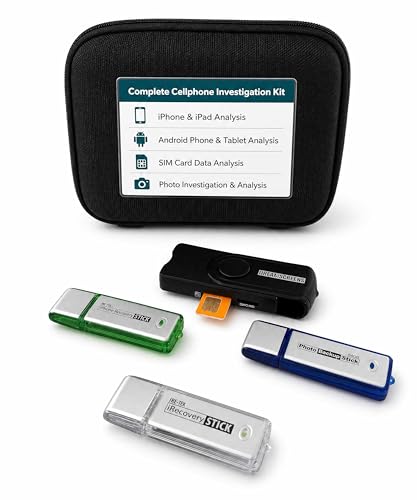
As an Amazon Associate I earn from qualifying purchases.
Yes—sometimes you can recover deleted text messages on Android, but it’s not guaranteed. Your best chance depends on whether SMS/MMS backups or cloud sync were enabled and whether the deleted data has been overwritten; this guide walks through the most reliable recovery paths, in the order you should try them.
Introduction

Deleted text messages can be recoverable on Android, but the process is highly dependent on your phone’s settings, your message app, and what happened after deletion. Android phones don’t “store” messages in a single universal place; SMS content is tied to device storage and—when enabled—may also be replicated to backups, Google accounts, or third-party sync services. That’s why “it might work” is the honest answer: if backups exist and haven’t been replaced, recovery can be straightforward; if not, your odds drop sharply.

To keep expectations realistic, think of recovery as a race against time and overwriting. When messages are deleted, the app may remove indexes or mark records for reuse, but recovery tools and backup restore can sometimes pull the content back—especially on the same device and within a window where the storage hasn’t been heavily used.
Recovery Likelihood by Android SMS “Signal” (Practical Outcomes)
| # | What You May Have | Typical Coverage | Time Sensitivity | Recovery Confidence |
|---|---|---|---|---|
| 1 | Google Messages backup to Google One | SMS threads synced | High (restore from recent snapshot) | ★★★☆ (Strong) |
| 2 | Switching devices with same Google account | Often includes recent SMS state | High (depends on restore window) | ★★★☆ (Good) |
| 3 | Carrier/enterprise archive availability | Limited, varies by plan/region | Medium (depends on retention) | ★★☆☆ (Uncertain) |
| 4 | Message app export (CSV/PDF backup) | Depends on export date | Low to Medium (if you exported recently) | ★★★☆ (High if available) |
| 5 | Third-party SMS backup app used | May include SMS/MMS metadata | Medium (restore depends on app retention) | ★★★☆ (Often viable) |
| 6 | Deleted messages only on device (no backups) | May be partially recoverable | Very High (overwriting kills odds) | ★☆☆☆ (Low) |
| 7 | Device reset / heavy post-deletion use | Records likely overwritten | Critical (worst case) | ★☆☆☆ (Worst) |
Check if Messages Were Backed Up
Before you attempt any complex recovery, verify whether your SMS or conversation history was backed up. This is the most reliable route because it restores content from a known snapshot rather than trying to reconstruct deleted data from storage.
Start with Google’s ecosystem:
- Look for Google Messages backup (if enabled) or any SMS backup apps you used
Many users rely on the default Google Messages app and may not realize backup is optional or requires configuration. If you used a third-party SMS backup app, check whether it stored backups locally, to cloud storage, or to an account tied to your device.
- Check Google One backup settings and your backup timeline
In Settings → Google → Backup, confirm that “Back up to Google One” (or equivalent backup options) was turned on. Then review the backup timeline to see when the most recent snapshot occurred. If your messages were deleted after that snapshot, the backup might not contain them; if the delete happened before, recovery becomes much more likely.
Practical tip: if you recently changed phones, reinstall the same message app you used before and restore your backups to preserve thread identity. SMS recovery is far better when the destination app and account match the source backup.
Use Android Built-In Recovery Options
Android built-in recovery is often overlooked, but it can be your fastest path to restored SMS history—especially after a device migration.
Try these steps:
- Review your Message app settings for restore/sync options
In Google Messages, check whether settings related to backup, RCS, and chat features are consistent with your prior configuration. While RCS is not the same as classic SMS, settings changes sometimes affect whether the app re-synchronizes message history from the cloud or re-associates your threads.
- If you switched devices, check whether the new phone restored SMS from backup
When setting up a replacement Android phone, use the same Google account and ensure you complete the restoration process (including app data restore). If you skip restoration at setup or do it incompletely, SMS history may never be rehydrated, leaving you with only what existed on the device at handoff time.
What “works best” in built-in recovery:
- Same account, same message app, and a backup snapshot that includes the deleted time period.
- Restores performed promptly after setup, before you heavily use the new device (so the app has consistent state and less chance of local overwrites).
If you do not see SMS restore in the messaging app after a fresh setup, don’t immediately jump to recovery tools. First, verify that the backup actually includes messaging data by checking Google One/Backup history and any restore indicators in your setup flow.
Recover Deleted Messages with a Backup or SIM/Data Source
If backups are available but not surfaced automatically, you can still recover messages by restoring from the correct source—or by checking whether the messages were stored elsewhere than you assumed.
Consider these scenarios:
- If your messages were synced to the cloud, restore via the associated account
Some SMS ecosystems rely on the same account data used for device backups. If your backup app or message system syncs to a cloud account, sign in with that account on your phone (or on your desktop companion app, if one exists) and run the restore process again.
- Consider whether any messages were stored to an external source (like an exported archive)
If you ever exported messages for compliance, switching phones, or record-keeping, you may have a file locally or in cloud storage (Drive, Dropbox, or an internal business archive). Even if the messages aren’t recoverable on the device itself, an export can give you a complete conversation timeline.
Examples of “data source” checks that often pay off:
- Google Drive search for backup/export files created by SMS backup apps.
- Local storage search for exported artifacts (often labeled by month/date or by app name).
- Email attachments if you ever sent exported logs to yourself for safekeeping.
In business contexts, this is especially common: employees sometimes export message histories to support customer support workflows, legal holds, or handovers. If your messages were part of work communications, ask whether your organization uses device management tools or encrypted archives.
Try Third-Party Data Recovery Tools (With Caution)
When no backups exist, some users turn to third-party Android SMS recovery tools. This can sometimes succeed, but it’s also where risk increases—especially if you continue using your phone after deletion.
Use third-party recovery only with these safety principles:
- Choose reputable recovery software designed for Android SMS recovery
Look for tools with clear documentation about Android versions, required permissions, and a transparent approach to scanning message databases. Be wary of products that promise guaranteed SMS recovery regardless of conditions.
- Stop using the phone to avoid overwriting deleted message data
Deleting messages doesn’t usually wipe storage instantly—it often marks records as available for reuse. Every new app activity, photo, download, or update can overwrite portions of storage, reducing recovery odds.
What “good practice” looks like before running a scan:
- Put the phone in Airplane mode to limit background syncing.
- Avoid installing new apps or updates.
- If the tool allows it, create a forensic-style backup of the phone storage first (not just a “quick scan”).
- Prefer a tool that works on a copy/extracted image rather than directly changing your device state.
Important reality check: even the best tools can’t resurrect messages that were overwritten or destroyed during a factory reset. Recovery success is highest when deletion was recent and the device has had minimal activity afterward.
Contact Your Carrier or Sender (Limited but Possible)
In some cases, you may be able to regain message content or reconstruct key details by involving the carrier or the other party. This is not a guaranteed method, but it can work—particularly for time-sensitive or business-critical communications.
Try these approaches:
- Ask your mobile carrier if they can help with SMS logs or backups
Carriers generally do not provide full message history to consumers on demand, but policies vary by region and plan. Some carriers can confirm delivery details, timestamps, or maintain limited logs for a retention period.
- If the other person still has the messages, they may resend key details
For personal disputes, scheduling issues, or lost confirmations, the simplest path is often to ask the recipient to forward key messages. Even if you can’t recover the entire thread, you may be able to rebuild the essential content.
Business-use example: if a customer agreement or verification code was lost, ask the recipient (or internal team member) to resend the message, and—if relevant—request a timeline confirmation that matches your internal records. Often, reconstructing the conversation’s key points is more practical than pursuing complete recovery.
Conclusion
Deleted text recovery on Android is possible in some cases—especially when backups or sync were enabled and the deleted data hasn’t been overwritten. Start by checking Google Messages backup and Google One backup history, then use built-in restore options if you switched devices. If that fails, evaluate whether any external exports or archives exist, and only then consider third-party recovery tools with caution. When necessary, contact your carrier or ask the sender/recipient to resend critical details.
Frequently Asked Questions
Can you find deleted text messages on an Android phone?
Sometimes yes, but it depends on what happened after the messages were deleted. If the deleted text data hasn’t been overwritten, recovery may be possible using Android SMS backup tools or a forensic data extraction method. If you used services like Google Messages backup or your carrier’s backup features, you may also be able to restore deleted SMS directly.
How can I recover deleted text messages on Android if I don’t have a backup?
Start by stopping new activity on the phone to reduce the chance of overwriting the deleted message records. Then try checking whether you have cloud or app backups (for example, Messages/Google backups) and restore from there if available. If no backups exist, you may need reputable Android data recovery software or a professional forensic tool that can scan internal storage for residual SMS data.
Why do deleted text messages sometimes reappear after recovery attempts?
Android “deletes” messages by marking the storage space as available rather than immediately erasing the content, so data may remain for some time. Recovery tools can sometimes find SMS fragments or database records if they weren’t overwritten by new files or SMS activity. However, once the space is reused, recovery chances drop significantly, making timing and careful phone use important.
What is the best way to recover deleted SMS messages on Android—backup restore or recovery software?
If you have an SMS backup (such as Google Messages backup or an exported backup from your messaging app), restoring from backup is usually the safest and most reliable option. If you don’t have any backup, recovery software can be helpful, but results vary based on Android version, device storage state, and how long ago the deletion occurred. In serious cases (or if you need the most complete data), a forensic extraction approach may be the best path to maximize what can be retrieved.
Which Android apps or services can help retrieve deleted text messages?
The most common options include Google Messages backup (where supported), carrier-provided backup features, and messaging apps that support exporting or syncing SMS history. Some users also rely on cloud backups or third-party apps that maintain message history—if they were enabled before deletion. For deeper recovery when no backups exist, consider reputable Android data recovery tools that focus on SMS databases, but always verify compatibility with your specific Android model and version.
References
- Google Scholar Google Scholar
https://scholar.google.com/scholar?q=can+you+recover+deleted+sms+messages+on+android - Google Scholar Google Scholar
https://scholar.google.com/scholar?q=android+forensic+recovery+deleted+text+messages+sms - Google Scholar Google Scholar
https://scholar.google.com/scholar?q=mobile+device+forensics+recover+deleted+messages+android - https://pubmed.ncbi.nlm.nih.gov/?term=android+forensic+analysis+sms+recovery
https://pubmed.ncbi.nlm.nih.gov/?term=android+forensic+analysis+sms+recovery - https://en.wikipedia.org/wiki/Mobile_phone_forensics
https://en.wikipedia.org/wiki/Mobile_phone_forensics - Data recovery
https://en.wikipedia.org/wiki/Data_recovery - https://www.nist.gov/publications/detail/sp/800-101/rev-1/final
https://www.nist.gov/publications/detail/sp/800-101/rev-1/final - https://www.sciencedirect.com/search?qs=android+deleted+sms+recovery
https://www.sciencedirect.com/search?qs=android+deleted+sms+recovery - https://www.ncjrs.gov/pdffiles1/nij/246491.pdf
https://www.ncjrs.gov/pdffiles1/nij/246491.pdf - Mobile device security and data protection | Android
https://www.android.com/safety/